
AudioStudio: Web-Based Audio Editing with Cloud Sharing
Overview
AudioStudio is a web-based audio editing tool designed for users who need to create, modify, or enhance audio content directly in the browser. Built as an integration between the "Beautiful Audio Editor" and the RedcoolMedia cloud platform, it offers a streamlined experience for both casual users and professionals working on music production, podcast editing, or audio content creation. The software enables users to import audio files via URL links for MP3 and WAV formats, allowing quick access to online audio sources without manual downloads. This feature is particularly useful for content creators who work with remote assets or collaborate across teams.
It supports core audio editing functions such as trimming, splitting, duplicating, merging, adjusting speed, and modifying volume. These capabilities make it suitable for tasks ranging from short audio clips for social media to full-length music compositions. The inclusion of cloud-based sharing through RedcoolMedia allows users to distribute edited audio files easily, enhancing workflow efficiency in collaborative environments. The software is open source, promoting transparency and community-driven development.
Target users include independent musicians, podcasters, educators, and digital content creators who require accessible, lightweight audio tools without the need for heavy desktop installations. While specific developer background information is not provided, the integration with a known platform suggests a focus on usability and scalability. Real-world usage scenarios include editing interview clips, creating background music, or preparing audio for online distribution.
Key Features & Capabilities
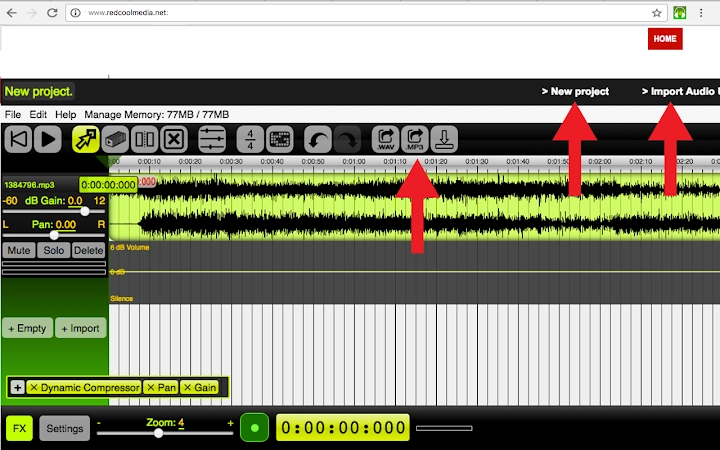
- URL-Based Audio Import – Users can import MP3 or WAV files directly from public URLs with a single click, eliminating the need for local file transfers.
- Cloud-Based Sharing – Projects can be shared or downloaded as WAV or MP3 files through the RedcoolMedia platform, enabling seamless collaboration and distribution.
- Core Editing Tools – Includes play/pause, reset, move, duplicate, split, remove, and render functions for precise control over audio segments.
- Time Signature Display – The grid can be set to 4/4 time signature, providing a rhythmic reference ideal for music production and beat alignment.
- Undo/Redo Functionality – Allows users to revert or restore actions, improving workflow safety and flexibility.
- Audio Effects Processing – Supports gain, pan, dynamic compression, and frequency filters for both individual tracks and master output.
- Zoom Controls – A footer slider enables users to zoom in or out for detailed editing or broader timeline views.
- Real-Time Recording – Includes a recording button to capture mono audio through the default microphone, supporting live voice input.
These features support a wide range of real-world applications. For instance, podcasters can import remote interview clips via URL, trim unwanted sections, apply noise reduction via effects, and share the final version instantly. Musicians can split beats, adjust tempo, and merge multiple tracks into a single composition. The combination of browser accessibility and cloud integration makes AudioStudio a practical choice for remote and distributed workflows.
User Interface, Workflow & Performance
AudioStudio features a clean, intuitive interface centered around a timeline-based editor. Navigation is handled through a series of clearly labeled buttons, each dedicated to a specific function such as play/pause, reset, or move mode. The layout is optimized for direct interaction, minimizing clutter and prioritizing essential tools. Users can switch between editing modes—move, duplicate, split, and remove—by selecting the corresponding button, enabling efficient manipulation of audio segments.
Workflow efficiency is enhanced by the logical grouping of functions and immediate visual feedback during edits. The zoom slider at the footer allows for detailed inspection of waveforms, particularly useful when aligning audio precisely or editing short durations. The ability to record directly into the editor streamlines the process for voiceovers and live inputs.
Performance observations are based on general software behavior patterns. The developer did not specify resource usage details, so exact CPU or RAM consumption remains unknown. However, as a web-based application, performance may vary depending on browser capabilities and internet connectivity, especially when importing audio from URLs or rendering large files. Stability during extended editing sessions has not been publicly documented. The open-source nature of the software suggests potential for ongoing optimization, but real-world reliability under heavy loads is not confirmed.
Compatibility & System Requirements
AudioStudio is compatible with Windows, Mac, and Linux operating systems, making it accessible across major desktop platforms. It is designed as a web application, meaning it runs directly in modern browsers without requiring a traditional installation process. The application size is listed as 100 MB, which likely reflects the bundled assets and libraries needed for browser execution.
Exact system requirements were not listed. This includes details on minimum processor speed, RAM, or supported browser versions. Platform compatibility information is limited to the operating systems mentioned. Users should ensure their browser is up to date and supports modern web standards such as Web Audio API and HTML5 audio processing to ensure full functionality. The absence of specific hardware requirements means performance may vary based on individual device capabilities and network conditions.
Pros and Cons
Pros
- Web-based access allows use on any compatible device without installation.
- Direct URL import simplifies access to remote audio files.
- Cloud sharing via RedcoolMedia enables fast collaboration and distribution.
- Comprehensive editing tools including split, duplicate, merge, and trim.
- Open-source model promotes transparency and community contributions.
- Real-time recording and audio effects enhance creative possibilities.
Cons
- Performance may depend heavily on browser and internet speed.
- Exact system requirements and resource usage were not specified.
- Reliance on external cloud platform may affect privacy for sensitive projects.
- No offline mode confirmed; internet access required for full functionality.
- Limited information on long-term stability and update frequency.
FAQ Section
Is AudioStudio available for offline use?
AudioStudio is a web-based application, and its full functionality requires an active internet connection. Offline usage is not confirmed, and the integration with the RedcoolMedia cloud platform suggests that online access is necessary for most features.
Can I use AudioStudio on Linux?
Yes, AudioStudio supports Linux as one of its compatible operating systems. It runs in modern web browsers, making it accessible across Windows, Mac, and Linux platforms.
Is AudioStudio safe to use?
As an open-source application, AudioStudio’s code is publicly available for review. However, users should exercise caution when importing audio from untrusted URLs or sharing sensitive projects via the cloud platform. The developer did not provide specific security certifications or privacy policies.
Does AudioStudio offer regular updates?
Information on update frequency was not provided. As an open-source project, updates may be driven by community contributions, but no official release schedule or version history details are available.
What types of audio files can I export?
AudioStudio allows users to export projects as WAV or MP3 files. WAV exports are faster and preserve full audio quality, while MP3 exports offer compression for smaller file sizes at the cost of some audio fidelity.
Final Thoughts + CTA
AudioStudio stands out as a versatile, browser-based audio editor that combines practical editing tools with cloud integration. Its ability to import audio from URLs and share projects instantly via RedcoolMedia makes it ideal for remote collaboration and fast content creation. The inclusion of essential features like trimming, splitting, effects processing, and real-time recording supports a broad range of creative workflows.
While performance and system requirements are not fully detailed, the software’s cross-platform availability and open-source foundation offer strong appeal for users seeking accessible, transparent audio tools. It is particularly beneficial for podcasters, musicians, educators, and digital content creators who prioritize ease of access and collaborative sharing.
For those looking for a modern, lightweight audio editor that works directly in the browser with minimal setup, AudioStudio delivers a compelling solution. Download AudioStudio now to start editing your audio with ease.







